Mail Flow Configuration
The Mail flow configuration page shows your message sources and Microsoft 365 visibility, and information related to your domains.
The Message traffic panel houses settings for message sources and Microsoft 365 authentication and visibility. Your Microsoft journal address or Secure Email Gateway (SEG) Message intake address is also accessible from this panel. Click the pencil icon to change these settings. This takes you to a workflow to make changes.
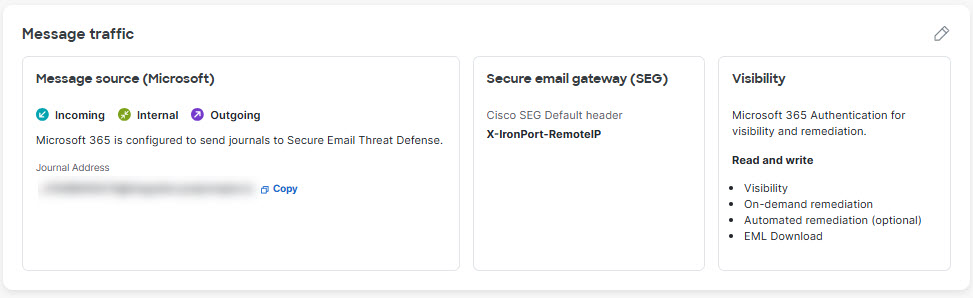
Table 1 Mail Flow Configuration Settings
| Setting | Description | Options | Default |
|---|---|---|---|
| Message Source | Defines the source for your messages. |
|
Manually selected when you set up Secure Email Threat Defense. |
| Visibility | Defines the type of remediation policy you can apply. |
|
Manually selected when you set up Secure Email Threat Defense. If you change your Microsoft 365 Authentication setting, you will be redirected to reset your Microsoft 365 permissions. You may also be directed to set up journaling; you can skip this step if you have already set up journaling. When you choose Microsoft 365 Authentication: Read and Write, you should also verify your Configuration Settings with a Gateway settings. |
| Secure Email Gateway (SEG) | The presence of a Secure Email Gateway (SEG) impacts how Secure Email Threat Defense identifies the Sender IP. |
|
Manually selected when you set up Secure Email Threat Defense. For more information, see Configuration Settings with a Gateway. |
| Domains — Domains are imported to help determine message directions. Domains are automatically imported from Microsoft 365 every 24 hours. Domains can be excluded from automated remediation policies. | |||
| Auto-Remediation | Applied to the domains not in the domains list. | Checked or Unchecked | Unchecked. When you turn on Read and Write visibility, select this check box. |