URL Rules
URL rules apply to messages that contain specified URLs. Currently, Bypass URL is the only action that can be applied with this rule type. For example, if you do not want URLs that point to your company intranet to be analyzed, you can create a URL rule to bypass analysis of your intranet URLs. The messages are fully scanned aside from the specified URLs.
URL rules can be created on the Configuration > Global Settings > URL rules panel.

Add a New URL rule
Complete the following steps to create a new URL rule:
-
Select Configuration > Global settings.
-
On the URL rules panel, click the New URL rule button.
-
Create a rule name. Each rule must have a unique name.
-
Enter the URLs you want to bypass analysis of.
The following bullets provide examples of valid formats. Note that path/query parameters are not supported.
-
Domain: example.com, www.example.com
-
Wildcard subdomain: *.example.org
-
Wildcard domain: *.com
-
IPv4 address: 192.168.1.1
-
IPv6 address: 2001:0db8:85a3:0000:0000:8a2e:0370:7334
-
-
Enter a short description for the rule.
-
Select what policy action you want to apply. Bypass URL is the only option currently available.
-
Click Save.
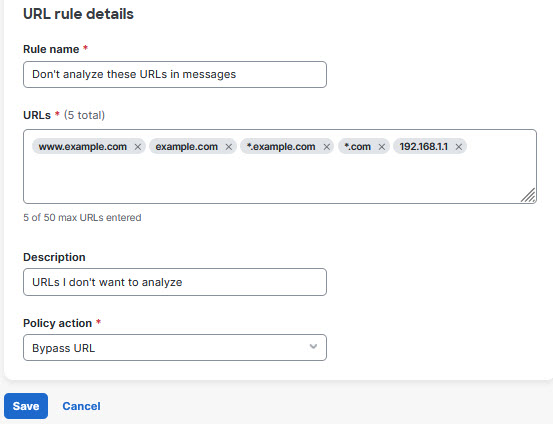
Your rule is added to the list. It may take up to 20 minutes for the change to take effect.
Edit a URL Rule
To edit a rule:
-
Select Configuration > Global settings.
-
On the URL rules panel, click the pencil icon next to the rule you want to edit.
-
Make your desired changes, then click Save.
Your rule is updated. It may take up to 20 minutes for the change to take effect.
Enable or Disable a URL Rule
To enable or disable an existing rule:
-
Select Configuration > Global settings.
-
On the URL rules panel, click the pencil icon next to the rule you want to edit.
-
Switch the Rule status toggle to Inactive or Active.
-
Click Save.
The status of your rule is updated. It may take up to 20 minutes for the change to take effect.
Delete a URL Rule
To delete a rule:
-
Select Configuration > Global settings.
-
On the URL rules panel, click the delete icon next to the rule you want to delete.
Your rule is deleted.